
Practical guides
How to Change One Detail in an AI Room Design Without Starting Over
Select the right earlier result, give the next version one clear job and compare parent with child before you continue the sequence.
You do not need to restart when an AI room design is almost right. In the Project Workspace, return to the result that contains the elements you want to keep, select it as the base, and use Edit with Instructions for one visible change. Name the object, the desired result and the surrounding features that should remain consistent.
Each edit creates a new generated version, not a deterministic pixel-level modification. Compare the new child with its immediate parent before continuing. If the requested detail improves and the rest remains useful, keep going. If architecture or several important elements drift, return to an earlier result—or restart from the room photo when the whole direction no longer fits.
1. Choose the parent before writing the instruction
The newest result is not automatically the right starting point. Open the project history and find the version that already has the wall, furniture arrangement, palette and lighting you want to carry forward. Check the selected preview before generating. An excellent curtain instruction applied to a version with the wrong rug still produces the wrong branch.
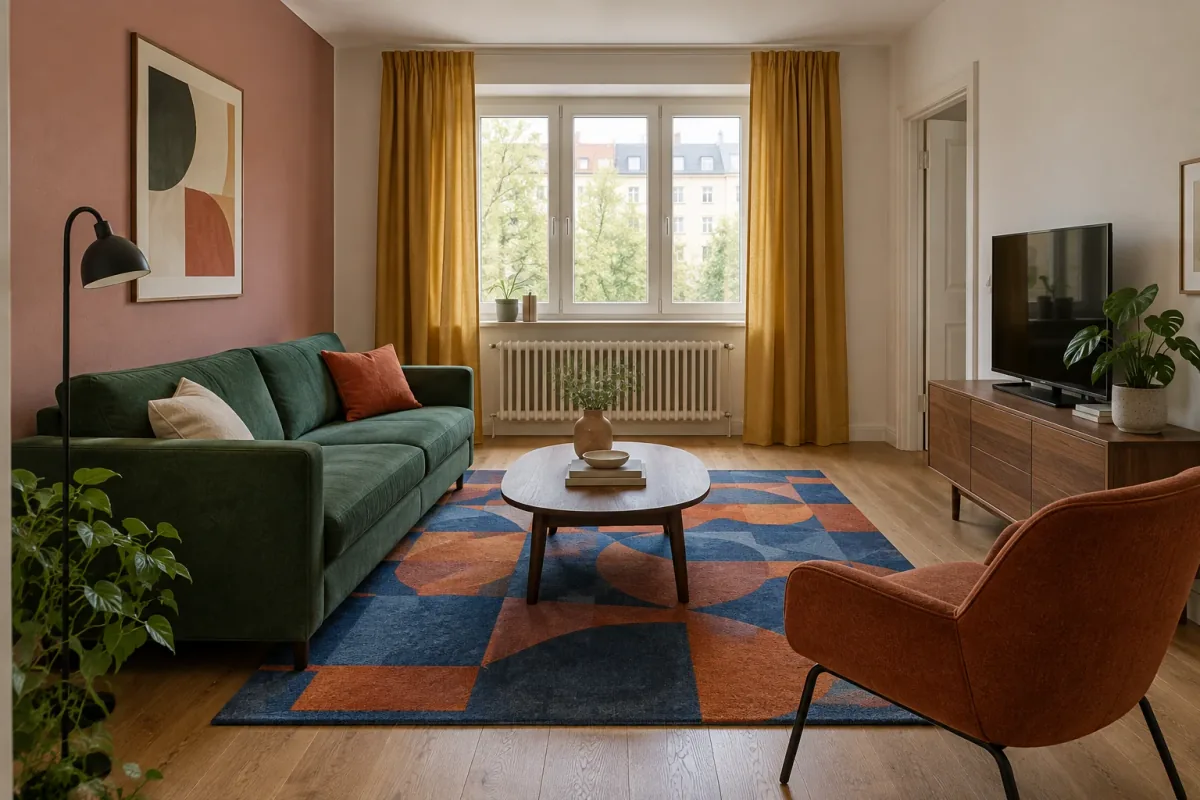
Describe why this image is the parent in one sentence: “keep the forest-green sofa, rust chair, dusty-rose wall, geometric rug and saffron curtains; the room only needs a calmer center.” This exposes whether your next request is truly a detail edit. If the sentence contains several disliked foundations, you may be trying to rescue the wrong version.
Our selected parent below is intentionally colorful. The window, radiator, doorway, sofa, chair, table and media cabinet form the stable composition. The first question is narrow: would a plain dusty-blue rug calm the room without losing the green, rust, saffron and rose relationship?
2. Give the next version one clear job
A focused instruction has three parts. First, identify the element by name and location. Second, describe the visible replacement—color, material, pattern or shape. Third, list a short set of important invariants. “Make it calmer” is feedback; “change only the geometric rug to plain dusty-blue wool” is an actionable edit.
Keep the preserve list proportional to the decision. Architecture, camera, major furniture, wall color and the pieces carrying your palette usually matter. A catalog of every cushion seam can bury the requested change and still cannot guarantee exact preservation. The instruction should make it easy for you to judge success, not attempt to control every pixel.
The object–change–keep pattern
Write the request in this order.
- Object: the rectangular rug under the seating and coffee table.
- Change: replace the bold geometry with plain muted dusty-blue wool.
- Keep its role: retain the same footprint and position.
- Keep the room: sofa, chair, table, curtains, walls, openings, camera and daylight.
- Exclude: no new furniture, styling or architectural changes.
3. Make the first focused edit
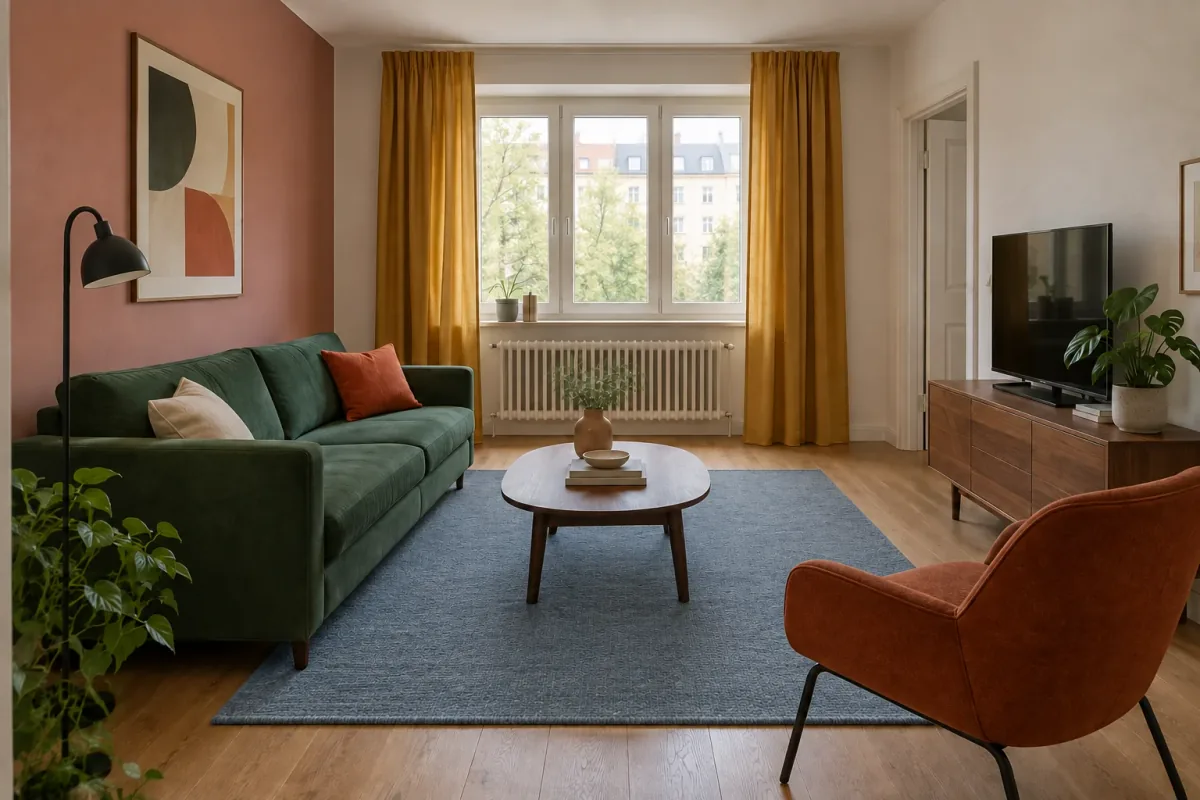
The first child replaces the cobalt-and-orange geometry with a plain dusty-blue wool rug. The quieter field allows the rust chair and saffron curtains to carry more of the contrast. Its footprint stays close to the parent, and the sofa, table, window, radiator, doorway and media cabinet remain recognizable.
Do not stop the review at the rug. The overall image is slightly softer and brighter, the plant shapes differ subtly and small styling details are reinterpreted. These changes do not necessarily make the concept unusable, but they are part of the cost of choosing this child as the next parent. Record them before another edit makes the sequence harder to reconstruct.
4. Compare parent and child in a fixed order
Place the parent and child at the same size. Check the requested object first: color, material, outline, location and relationship to nearby furniture. Then move around the frame in the same order—camera, ceiling and walls, openings, fixed fittings, main furniture, textiles, lighting and small decor. A consistent routine makes drift easier to notice than relying on a general impression.
Give the child a short decision note: “plain blue rug works; room anchors retained; image slightly brighter; plants vary.” The Project Workspace keeps the instruction and generation context together, while your note explains why this version is or is not worth continuing. You are evaluating a design branch, not trying to prove that nothing moved.
| Check | Parent | Child | Decision |
|---|---|---|---|
| Rug | Bold cobalt and rust geometry | Plain dusty-blue texture | Requested change works |
| Room anchors | Three-panel window, radiator, doorway | Remain recognizable | Acceptable base |
| Furniture | Green sofa, rust chair, walnut table | Positions remain consistent | Carry forward |
| Light | Balanced daylight | Slightly brighter/softer | Note the drift |
| Small styling | Original plants and accessories | Minor reinterpretation | Not critical to this decision |
5. Continue from the child only when you want its change
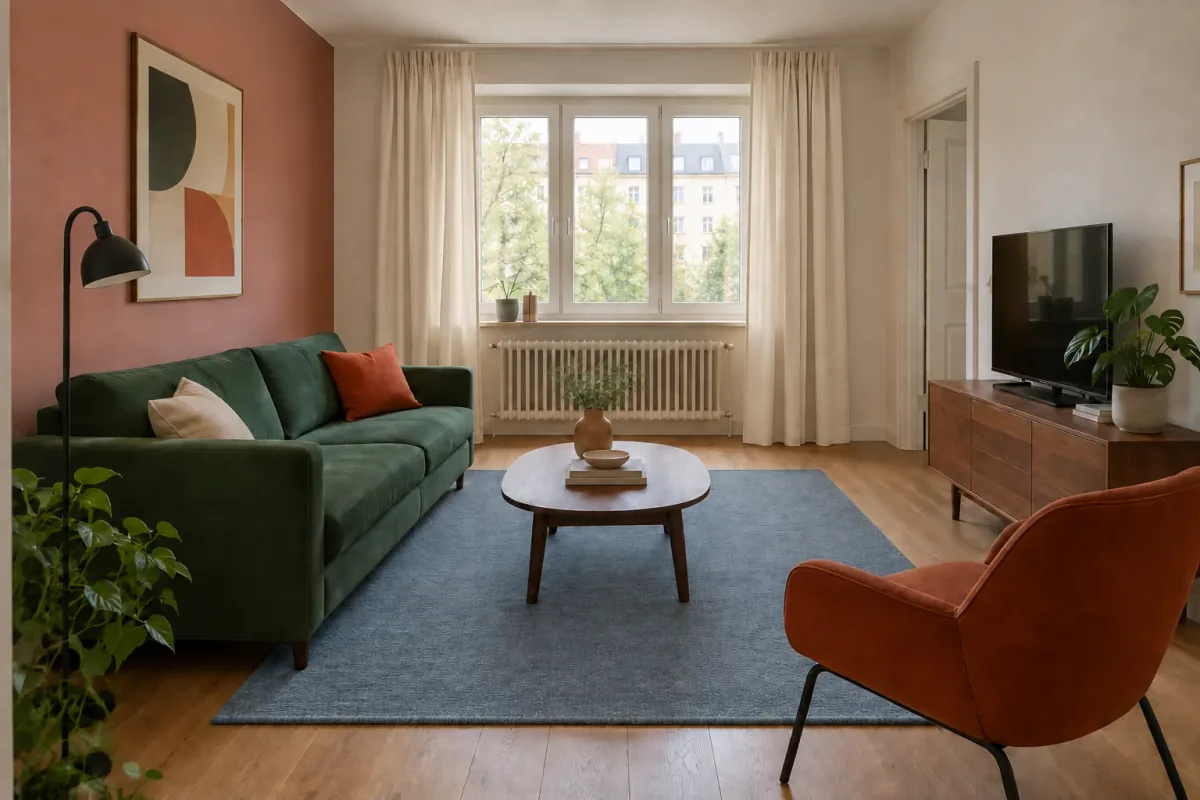
Suppose the plain rug is now part of the chosen direction and the saffron curtains feel too prominent. Select the rug child—not merely the newest thumbnail you happen to see—and ask for warm off-white linen curtains. The preserve list should explicitly include the dusty-blue rug so the second edit carries the first decision forward.
The grandchild below contains both intended changes: plain blue rug and light curtains. The window feels brighter and the room’s strongest remaining color sits in the green sofa, rust chair and rose wall. Again, some global softness and small-detail differences remain visible. Compare this image with the rug child to judge the curtain edit, and with the original parent to understand the full two-step sequence.
6. Return to an earlier parent when you want a different branch
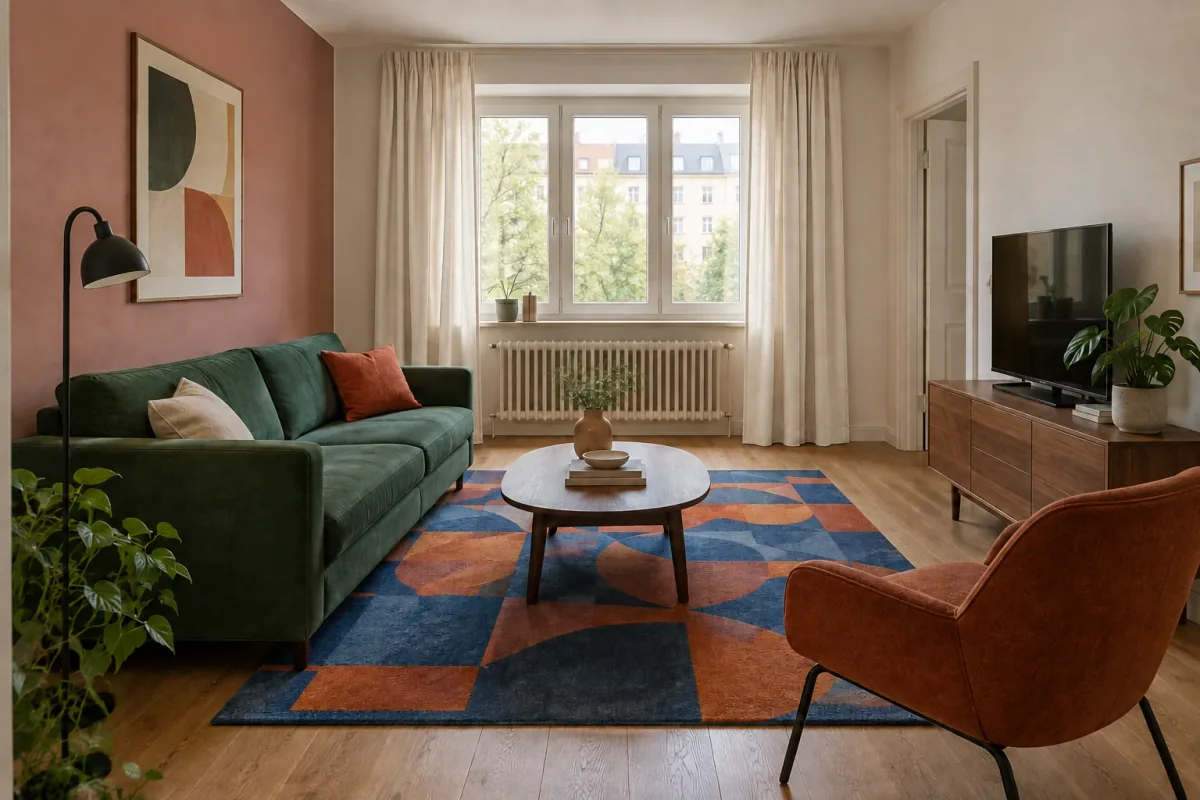
What if the curtains should be light but the original geometric rug should stay? Do not ask the grandchild to reconstruct the old rug from memory. Return to the selected parent and apply the curtain instruction there. Project history is useful precisely because an earlier successful version can become the start of a new branch.
The alternate child below keeps the cobalt-and-rust rug while changing saffron curtains to off-white. Now the difference between the branches is explicit: one contains both rug and curtain changes; the other contains the curtain change only. The edit wording is almost identical, but the selected parent changes the result you are asking to preserve.
7. Track requested changes and observed drift separately
A simple version log prevents attractive images from losing their meaning. For each result, record its parent, the one requested change, whether that change worked, and any visible drift. The sequence might read: V1 parent; V2 from V1, plain rug; V3 from V2, off-white curtains; V2B from V1, off-white curtains with original rug.
Keep requested decisions separate from incidental differences. “Curtains changed to off-white” is intentional. “Daylight appears softer” is observed drift. This distinction helps you decide which image should continue and gives useful context when you return to the project later. It also prevents accidental claims that a generated detail was preserved exactly.
Four fields are enough
Use a compact note beside important versions.
- Parent: which result was selected as the base?
- Job: what single visible change was requested?
- Outcome: did that change answer the question?
- Drift: what else changed enough to affect the next decision?
8. Decide whether to revise, branch or restart
Use another focused edit when the overall room, palette and major composition still work and one detail remains unresolved. Branch from an earlier result when you want to test an alternative without carrying forward a recent change. Return to the original room photo for a new redesign when you no longer want the concept’s foundation or when accumulated drift makes several corrections necessary.
Restarting is not failure, and continuing is not automatically efficient. One targeted correction to a good parent is usually informative. Four attempts to recover a moved doorway, wrong viewpoint and unwanted furniture are evidence that the current branch is no longer a useful base.
| Current state | Next move | Why |
|---|---|---|
| Room works; one finish is wrong | Focused edit | Keep the useful concept and answer one question |
| Earlier detail was better | Branch from earlier parent | Avoid rebuilding a preferred feature |
| Several styling choices need coordinated change | New broader direction | The task is no longer one detail |
| Openings, camera or room proportions drifted | Return to original room | Recover the spatial source before styling |
| Only tiny generated artifacts remain | Stop or regenerate cautiously | More iterations may introduce more drift |
9. Stop when the image answers the design question
A concept does not need perfect pixel continuity to help decide between a geometric and plain rug or saffron and off-white curtains. Once the relevant relationship is clear, save or download the preferred result with its short version note. Keep the project available if you expect another design question later.
Verify physical decisions outside the image. Measure the room and real products, view material samples under actual light and confirm availability and installation requirements. A generated rug pattern is not a product specification, and the apparent spacing around a chair is not a measured clearance.
The most useful endpoint is a small, understandable family of versions—not a long chain where no one remembers which image introduced the sofa, wall or lighting they prefer. Select the parent deliberately, give each child one purpose and stop before the revision history becomes the design problem.
Questions about editing one AI room detail
Can I edit only one object?
You can request one named object or surface change, but the next result is generated rather than deterministically retouched. Compare the whole child with its parent because other details may still shift.
Do I have to continue from the latest result?
No. Revisit the project history and select the earlier result that contains the features you want to preserve. The chosen parent determines which prior decisions the next child inherits.
Should I put every previous instruction into the new prompt?
No. State the one current job and a short list of important features to retain. The selected image already carries visual context; an exhaustive history can obscure the requested change.
What if the edit changes something else?
Record the drift and decide whether it affects your current question. Repeat from the same parent with a narrower instruction when necessary, or choose another earlier result if this child is no longer a useful base.
When should I start from the original room again?
Return to the room photo when you want a substantially different direction, when architecture or viewpoint has drifted, or when several corrections would be needed just to recover a usable foundation.